How to Lodge Your BAS: Step-by-Step for Small Business
Learn how to lodge a Business Activity Statement (BAS) in Australia. Covers quarterly deadlines, what to report, and how to pay or claim your GST refund.
Quick Answer: Lodge your BAS online via the ATO Business Portal or accounting software like Xero or MYOB. Report your GST collected on sales and GST credits on purchases, then pay the net amount (or receive a refund). Quarterly BAS is due 28 days after each quarter ends, with a two-week extension if you lodge online.
Most small business owners dread BAS time, not because it's genuinely difficult, but because it feels unfamiliar. Once you've done two or three, it takes less than an hour. Here's how to get through it cleanly.
What Is a BAS?
A Business Activity Statement (BAS) is a form you submit to the Australian Taxation Office to report and pay your tax obligations for the period. For GST-registered businesses, the BAS covers:
- GST: the net amount of GST collected on sales minus GST credits on purchases
- PAYG withholding: tax withheld from employee wages (if you have staff)
- PAYG instalments: advance payments toward your own income tax (if applicable)
This guide focuses on the GST portion, which is the core obligation for most small businesses without employees.
BAS Due Dates for 2026
| Quarter | Period | Due Date |
|---|---|---|
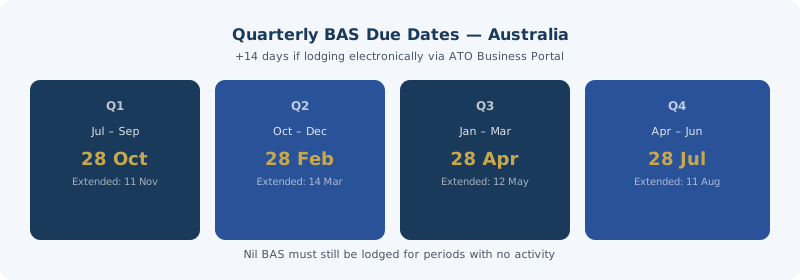
| Q1 | 1 July – 30 September | 28 October |
| Q2 | 1 October – 31 December | 28 February |
| Q3 | 1 January – 31 March | 28 April |
| Q4 | 1 April – 30 June | 28 July |
If you lodge your BAS electronically (online portal or through tax agent software), you get an extra two weeks. That means the effective deadline is typically 14 days after the dates above. Your registered tax agent, if you use one, also has access to extended lodgment schedules.
Mark these in your calendar. Late lodgment attracts a failure-to-lodge penalty: $330 for the first 28 days late, increasing from there.
What You Need to Gather
Before sitting down to complete your BAS, collect:
1. Total sales (GST-inclusive): all invoices you issued during the period
2. GST collected: the GST component of your sales (use our GST calculator to verify amounts if your software doesn't do this automatically)
3. Total purchases (GST-inclusive): all business purchases with valid tax invoices
4. GST credits: the GST component of eligible business purchases
5. All tax invoices: you must hold these to support your credit claims; you can't claim a credit without a valid tax invoice from the supplier
If you use accounting software (Xero, MYOB, QuickBooks), it should calculate these figures automatically from your transactions. If you're on a spreadsheet system, keep a column for GST-inclusive amount and a column for the GST component on every row.
Run each sale and purchase through our Australian GST calculator if you need to verify the breakdown. For a $2,420 GST-inclusive invoice, the GST component is $2,420 ÷ 11 = $220. The net amount is $2,200.
How to Complete the BAS
The BAS form has several labels. For a business with GST only (no employees), you'll mainly use:
G1 (Total sales, GST-inclusive): Add up all your invoices for the period, including GST. If you billed $33,000 ex-GST over the quarter, your G1 is $36,300 ($33,000 × 1.10).
1A (GST collected on sales): The GST portion of your G1 amount. In the above example, 1A = $3,300 ($36,300 × 1/11).
G10 (Capital purchases): Significant business assets purchased during the period (equipment, vehicles). Report GST-inclusive.
G11 (Other creditable purchases): All other business purchases, including office supplies, software subscriptions, professional services, and fuel. Report GST-inclusive.
1B (GST credits on purchases): The total GST you can claim back on G10 and G11 combined.
Net GST = 1A minus 1B. If 1A is $3,300 and 1B is $1,200, you owe the ATO $2,100. If 1B exceeds 1A (common in startups buying equipment), you get a refund.
Lodging Online
Step 1: Log in to the ATO Business Portal with your myGovID or through your accounting software's direct lodge function.
Step 2: Select your BAS for the relevant period. Pre-populated data (if you've enabled ATO data feeds) may already show some figures.
Step 3: Enter your calculated figures in the relevant labels. Double-check 1A and 1B against your records before submitting.
Step 4: Review the payment amount or refund amount. Confirm and submit.
Step 5: Pay the amount owing (if any) by the due date. The ATO accepts BPAY, bank transfer (EFT), card, and cheque. Bank transfer details appear on your BAS.
Refunds are processed within 14 business days of lodgment, usually faster.
Common BAS Mistakes
Claiming credits without tax invoices. The ATO requires a valid tax invoice for any purchase over $82.50 (GST-inclusive) to support a credit claim. No invoice = no credit. Chase outstanding invoices before you lodge.
Claiming credits on non-business expenses. Personal purchases mixed in with business ones don't qualify for credits. If your phone is 60% business use, only 60% of the GST on your phone bill is claimable.
Not reporting GST-free sales correctly. If you sell a mix of taxable and GST-free items, only the taxable portion appears in your 1A calculation. GST-free sales still appear in G1 (total sales) but don't add to GST collected. See our guide on GST-free items for the full list.
Leaving out a period. If you had no business activity in a quarter, you still need to lodge a nil BAS. The ATO expects a submission for every period from registration until you cancel your GST registration.
If You Made an Error on a Previous BAS
You can correct a GST error on your current BAS if the net effect is under $10,000 and the error was made in the previous four years. For errors above that threshold, you need to amend the original BAS through the ATO portal or via your tax agent.
Don't ignore errors, because interest accrues on underpayments. Our guide to common GST mistakes covers the most frequent slip-ups and how to fix them before they become problems.
Getting Help
If your affairs are straightforward, DIY BAS lodgment via the ATO portal is manageable. If you have employees, rental income, or complex mixed supplies, a registered BAS agent or tax agent is worth engaging, at least for your first few lodgments. Their fees are also tax-deductible business expenses, and the GST on those fees is claimable too.
Check the about our team page if you'd like more information on the tools and methodology behind this site. For ongoing BAS help, the ATO's Small Business Newsroom has guides and webinars specifically for new registrants.
Key Takeaways
Lodge your BAS on time, every quarter, even if you have nothing to report. The failure-to-lodge penalty applies whether your BAS is nil or substantial.
The key figures are 1A (GST collected on sales) and 1B (GST credits on purchases). Your net GST (1A minus 1B) is what you pay or receive as a refund. Calculate each figure using the divide-by-11 method on GST-inclusive amounts, and double-check against our Australian GST calculator before submitting.
The most common BAS mistakes are claiming credits without valid tax invoices, mixing personal expenses into business claims, and misclassifying GST-free sales as taxable. Run through our guide to common GST mistakes before your first lodgment.
Quarterly deadlines fall in late October, late February, late April, and late July. Electronic lodgment extends each deadline by two weeks. Put all four in your calendar now.
If you're unsure about any claim, hold off and get advice before lodging. An incorrect credit claim that gets picked up in an audit creates more work than checking it first. The ATO's website has detailed guides on BAS lodgment under the "business" section.